
Telegram Group Management Tool

Link your Telegram account, connect a group, and manage the routines around it from one dashboard. Set up welcomes and replies, plan messages, and review moderation items using data Metricgram has captured.

  • Automated welcome messages for new members
  • Keyword replies routed to a group, topic, or group admin
  • A review queue for join requests, reports, and selected spam signals
  • Stripe payment integration for paid groups
No credit card required Set up in 2 minutes

How it works

1

Link your Telegram account and connect a group

Link your Telegram account through Metricgram's setup, then add the bot to the group you want to manage. Account linking and group connection are separate setup steps.

2

Choose the routines to configure

Set welcome messages, keyword replies, scheduled posts, summaries, or moderation review for that group. Test each destination and rule with a message before relying on it.

3

Review activity and follow up

Use member, message, and moderation records Metricgram has captured to decide what needs attention. Standard Bot API capture starts with updates received after connection; separately configured optional extraction may import available earlier messages.

Keep routine group work in one dashboard
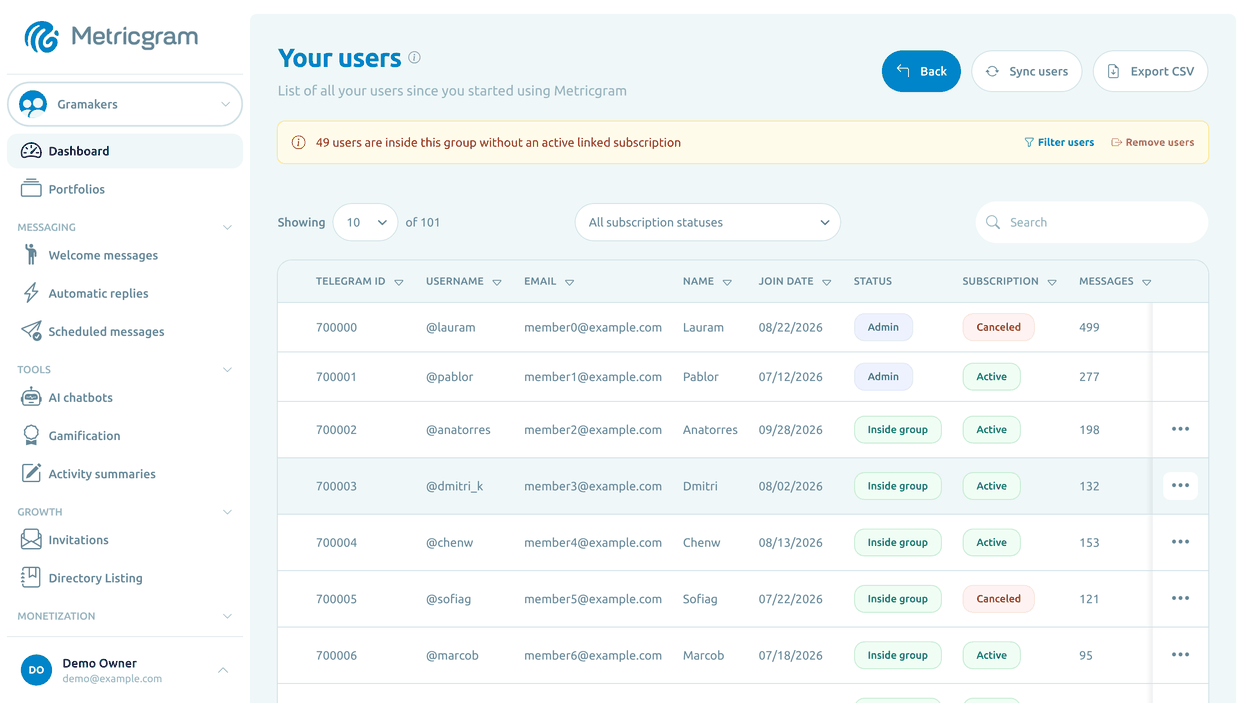
A group may need a welcome flow, a reliable answer to common questions, planned announcements, and moderator follow-up. Configure those tasks for each connected group, then check that they still fit your community's current rules.
Telegram Group Management Tool
01

Automate welcomes and onboarding

Make a great first impression with customized welcome messages that greet every new member automatically. Set up onboarding flows that guide new members, share rules, and point them to important resources.
02

Route common answers to the right place

Set a phrase or word-matching rule for a common question and choose whether its reply goes to the same topic, the general chat, another topic, or the linked group admin privately. A private reply goes to the admin, not the member who asked.
03

Review moderation before acting

The queue can collect join requests, member reports, and selected signals such as repeated messages or links from recently joined members. Items wait for moderator review by default; automatic link deletion or muting requires an opt-in rule and suitable Telegram permissions.
04

Use recorded member context

Review membership status and activity Metricgram has received for the connected group. Standard Bot API capture starts after connection; a separately configured optional extraction workflow may import available earlier group messages. Read activity records in context rather than treating them as a complete measure of member value.
05

Scheduled messages and recurring content

Plan and schedule messages, announcements, and recurring content in advance. Keep your group active and engaged with consistent, timed posts without needing to be online.
06

Monetize with Stripe Connect

Turn your group into a revenue stream. Integrate Stripe to manage paid memberships, charge for premium access, and automate payment collection — directly from Telegram.

Metricgram vs. Manual Management

Metricgram Manual
Automated welcome messages
Keyword-triggered replies
Scheduled messages
Member analytics
Moderation review queue
Stripe payment integration
Daily activity reports
Multiple group management

Frequently Asked Questions

What is a Telegram group management tool?
A Telegram group management tool automates repetitive tasks like welcoming members, moderating content, sending scheduled messages, and tracking analytics — so admins don't have to do everything manually.
How do I add Metricgram to my Telegram group?
Start your 14-day free trial, follow the setup wizard to add the Metricgram bot to your group, and begin configuring your settings. The whole process takes less than 2 minutes.
Can I manage multiple Telegram groups?
Yes. Metricgram supports managing multiple groups from a single dashboard. Switch between groups easily and configure each one independently.
Is Metricgram free to use?
Metricgram offers a free trial with Elite plan access. After the trial, choose a paid plan to keep using the dashboard, automations, AI chatbots, gamification, and analytics.
Does Metricgram work with Telegram channels?
Metricgram is specifically designed for Telegram groups (including supergroups with topics). Channel support is focused on groups that have active member interaction.
Can I automate moderation?
You can review join requests, reports, and selected spam signals in the moderation queue. Items wait for a moderator by default; specific automatic actions are optional and depend on Telegram permissions. Keyword replies answer configured phrases and words but do not enforce group rules by themselves.
How is Metricgram different from other Telegram bots?
Metricgram is an all-in-one management platform — not just a bot. It combines automation, analytics, monetization, and member management in a single dashboard with a user-friendly interface.

Get started in minutes

Connect your Telegram group in minutes and try every feature free for 14 days.

See pricing